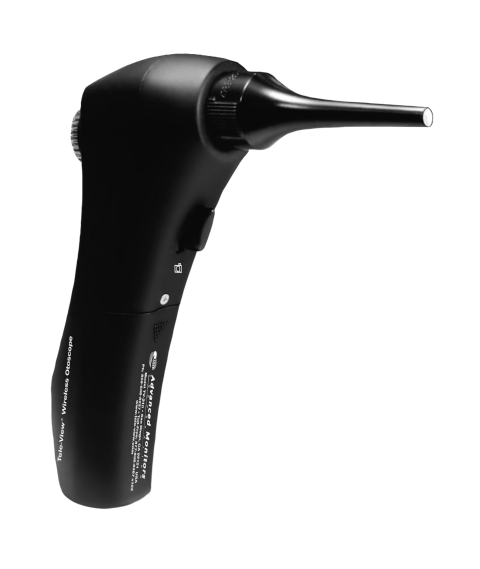
Tele-View TV-210V Video Otoscope
$995.00
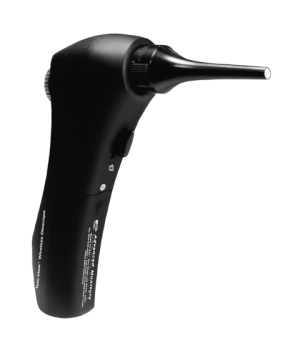
The Wireless Video Otoscope magnifies and displays pathology on any computer, providing real-time or saved images for better client education and treatment compliance. Ideal for a clear diagnosis and improved communication in veterinary practices.
Description
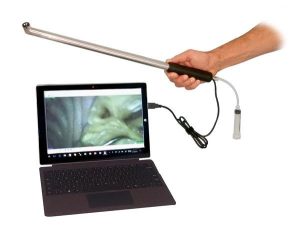
The Video Otoscope easily displays patient pathology on Windows computers, laptops or tablets. It can be used in both Wired and Wireless modes. It Improves patient education and compliance by presenting problems to patients in real-time. The simple and easy design of the otoscope allows for quick set-up and use. The software is included and installs quickly on your computer. The high resolution jpg images can easily be saved to the patient record or sent by e-mail to clients or associates.
Risk-free purchase! If not completely satisfied, return for credit (less shipping) within 30 Days.
Features
- Detailed, High-Resolution Images
- Focus and Brightness Adjustments
- Works with Windows Computers, Laptops or Tablets
- Working Channel for Foreign Body Removal
- Easy Image Capture and Storage to Patient Records
Benefits
- Improves Client Education and Compliance
- Increases Revenue by Verifying Necessity of Procedure
- Easier for Practitioner to See Pathology
- Safer Viewing for Practitioner – Keeps Face Away from Teeth
- Also Great for Viewing Nasal Cavity, Teeth, Gums and Skin
Specifications
| Feature | Specification |
|---|---|
| Speculum Sizes | 4mm (Bore size); 45mm (Length) 4mm (Bore size); 66mm (Length) 7mm (Bore size); 73mm (Length) |
| Wireless Link | Wi-Fi |
| Wi-Fi Bandwidth | 2.4GHz |
| RF Power | 10dBm |
| Wireless Range | 10m (pending environment) |
| Display | Wireless (Wi-Fi) or Wired (USB) to PC/Notebook/Smartphone |
| Screen Size | External Computer/Smartphone |
| Image Resolution | Wi-Fi: 1280 × 720 (HD) USB: 480 × 320 5.0 MP (camera resolution) |
| Magnification | Manual: 50X (max) Digital interpolation: 4X (max) |
| Focus Type | Manual |
| Manual Focus Range | 30mm ~ 10m (Object to Lens) |
| Video | Format: raw is JPEG, transfer video format by PC/SP HD 1280 × 720 @30fps |
| Video, Image Files | BMP, JPG, AVI (raw is JPEG, transfer by PC/SP) |
| Video Mode | Yes |
| Image Export from Video | YES (by PC/SP) |
| External Display Possible | Required |
| Light Source | 5 LEDs, 16 brightness levels |
| General | Requires external computer/smartphone |
| External Cables Required | Yes |
| Driver or App Installation | Yes |
| Date/Time | Yes |
| Other Requirements | Cables, drivers, computer |
| Battery | AAA NiMH battery × 3 |
| Charger Interface | USB 2.0, USB Mini |
| Dimensions | L 170mm × W 40mm × H 70mm |
| Software OS | Windows 10, 11 |
Testimonials
The best designed veterinary video otoscope available. We use them every day to generate additional revenue by showing every ear to every client!
– Dr. Albert Nunez, Animal Hospital at Baldwin Park, Orlando, FL
I just want to tell you how much we love the video otoscope. Since we started using it, we have wowed our clients with this unit. It always amazes people to see the ear canal of their pet on the screen in the exam room. To see ear mites crawling around in the ear building their little earmite condos is absolutely amazing (and disgusting, LOL). We see a lot of exotic animals here and it’s the best way to evaluate the cheek teeth in rabbits and rodents. Now that we have this device we don’t know how we lived without it. It has improved patient care tremendously and it paid for itself many times over. Clients who are MD’s say our image quality is better than what they see with their wired systems. Also, thank you for the awesome customer service.
– John M. Ehrhardt, DVM, Wenona VetCare, Wenona, IL
I find the Tele-View Digital Video Otoscope to be an extremely valuable and cost-effective tool in the exam room for client education and diagnosis. When a client sees the pathology, it raises compliance of treatment at home, especially when the client sees progress at recheck appointments. It motivates clients to consent to and follow-through with treatment and rechecks. We have both wireless and wired units, and are extremely pleased with the value-added performance for both examination and surgical use.
– Carl Finkstrom, DVM Lunenberg Veterinary Hospital, Lunenburg, MA 01462
The Tele-View Wireless Otoscope is a fantastic tool for displaying ear pathology! The magnifying and digital features make it not only easy to use but also help to educate clients on the necessity of the recommended treatment. I am very pleased with the way the controls provide easy, one-handed adjustment while I’m watching the viewing screen. I recommend this innovative otoscope for any clinic!
– Dr. Rex Bach Norwood Animal Clinic, S.C., Milwaukee, Wisconsin
The Tele-View Wireless Otoscope has made me much more confident in ear diagnosis and treatment. I can now see even the smallest details on the ear drum much better than when I was a young practitioner with perfect eyesight! When coupled with an inexpensive monitor, clients can see the ear problems and it’s an easy next step to generate additional treatment revenue. Thank you for this new tool for the profession!
– Miranda Alexander, DVM Balboa Vet Clinic, San Diego, CA
FAQs
Video Otoscope FAQ
1. What devices is the Video Otoscope compatible with?
The Video Otoscope works with Windows computers, laptops, and tablets. It connects via USB (wired) or Wi-Fi (wireless). It also works with iOS and Android devices.
2. Can I use it wirelessly?
Yes, the device supports Wi-Fi connectivity with a range of up to 10 meters (depending on environment) on a 2.4GHz band.
3. What image and video resolutions does it provide?
-
Wi-Fi (HD): 1280 × 720
-
USB: 480 × 320
-
Camera resolution: 5.0 MP
Videos can be captured at HD 1280 × 720 @30fps, and images/videos can be exported in JPG, BMP, or AVI formats.
4. How do I save images or videos?
Images and videos can be saved directly to patient records on your computer or sent via email to clients or associates.
5. What speculum sizes are available?
-
4mm bore
-
4mm bore with working channel
-
3mm bore
6. Can the otoscope help with procedures?
Yes, it includes a working channel speculum which can be used with forceps for foreign body removal and allows practitioners to view nasal cavity, teeth, gums, skin, and ears.
7. How do I adjust focus and brightness?
The otoscope offers manual focus (30mm to 10m) and 16 LED brightness levels, which can be adjusted directly on the device.
8. Does it require software installation?
Yes, the included software installs quickly on Windows 10 or 11 computers. It is required for image capture, storage, and video recording.
9. How is magnification handled?
-
Manual magnification up to 400% of normal zoom.
-
Digital interpolation up to 4X
10. What kind of battery does it use?
The device uses 3 AAA NiMH batteries and charges via USB 2.0 or USB Mini interface.
11. What are the physical dimensions of the otoscope?
The otoscope measures 170mm × 40mm × 70mm (L × W × H).
12. Can I display images on an external monitor?
Yes, an external computer or smartphone can be used as the display. The device itself requires an external screen.
13. Is it easy to clean between patients?
Yes, the design allows for quick cleaning, and images/video capture is contactless with speculum covers or protective barriers.
14. Is there a return policy?
Yes, the Video Otoscope comes with a 30-day risk-free purchase. If you’re not completely satisfied, return for credit (less shipping).
15. How does it improve client education and compliance?
By showing pathology in real-time, clients can see problems directly, making procedures more understandable and increasing acceptance.